
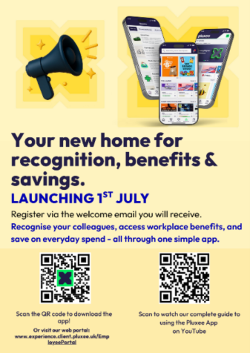
Our new upgraded Pluxee Employee Experience app and portal is now live – open the app or the web portal to start using it.
Want to find out more? Check out the recording of the webinar with tom from Pluxee HERE.
Watch his live demo as he explains:
- How the Pluxee marketplace discounts and wider benefits come together in one easy-to-use app.
- How to find hundreds of places to save and make your money go further.
- How to use the colleague recognition feature.
Getting started
- Getting started is simple. Open the app or the web portal and click ‘Get started’.
Important note: If you were previously registered, you will need to register again for the new Pluxee platform.
- To get the new Pluxee UK App on your phone, just scan the QR code in the poster, and download it to your phone. (note – search for ‘Pluxee UK’, not just Pluxee)
- Once registered, login on the app, complete the two-step authentication and you’ll be all ready to access the app or website. You will only need to use the authentication process on the app version the first time – after that you will be logged straight in.
- To access our new Pluxee Employee Experience on a web browser* via your PC click this link: client.pluxee.uk/EmployeePortal
*Important note – this will not work if you are using VPN. Turn off the VPN and try again.
For Managers, if your team members do not have a Cemex email address and were not previously registered on our Cemex Lifestyle Portal but they would like to register for this new Pluxee App, please ask them to send an email using their personal email address to: gb-compensation&[email protected] requesting a registration link.
Training Guides
We have created some short videos to guide you through downloading, exploring, and using the new app.
- Downloading the Pluxee UK app.mp4
- Getting registered.mp4
- Getting to know the app.mp4
- Recognising your colleagues.mp4
- Setting your preferences and notifications.mp4
- Complete Guide to using new Pluxee App (all videos combined).mp4 (available via YouTube here: https://youtu.be/hJZX9obFGI8)